For students who think in pictures, understand contexts visually, and remember through what they see – not just what they read or hear.
Key idea: Visual ≠ “graphic design”
Visual modalities are not just about decoration or diagrams – but about giving meaning through what is seen. It is about:
- See systems and concepts in concrete contexts
- Sensing reality, application and purpose
- Organize complex information in an intuitive way
- Making the invisible visible
Toolbox: Visual Modalities for Asynchronous Learning
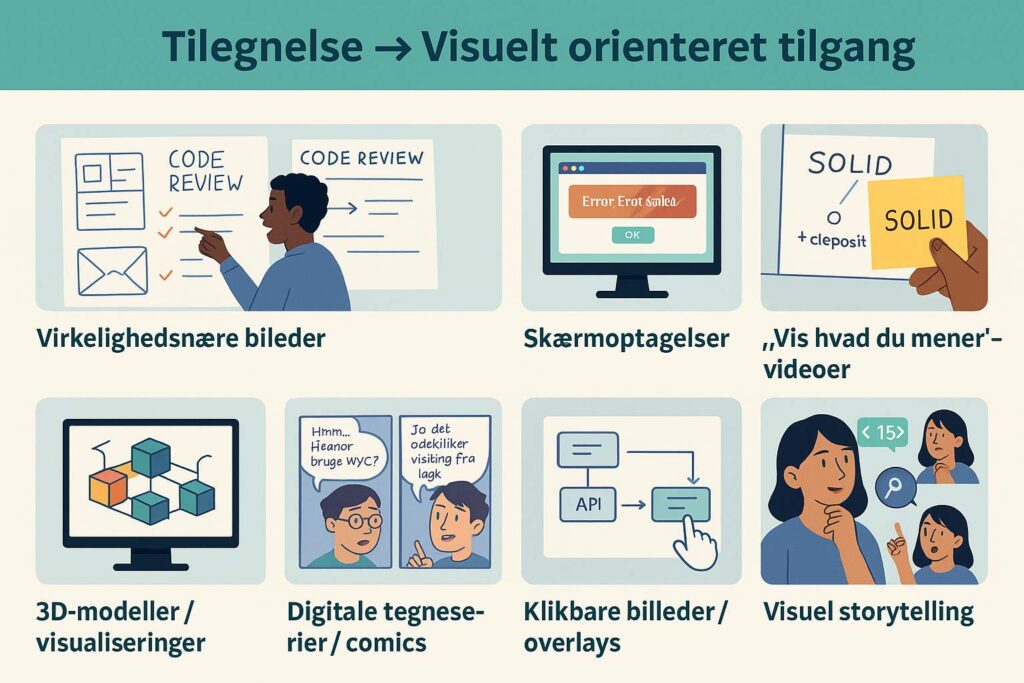
| Modality | What does it do? | Example from computer science education | IT option (e.g. Rise) |
| Real-world images | Creates a connection to practice – “this exists in the real world” | Images from whiteboards, code review sessions, paper-based architecture diagrams | Image block, Image with caption |
| Photo-based cases | Presents a problem visually before the theory is introduced | An image of an error message with the question: “What would you do?” | Image + Knowledge Check, Scenario block |
| Screen recordings | Make abstract systems concrete | Video of an IDE while building a class, with spoken explanation | Video embed, Video + reflection |
| “Show what you mean” videos | The instructor/teacher uses a whiteboard, paper, or physical objects to explain visually | Explaining the SOLID principles using Post-its and hand drawings | Video + writing field, Video + questions |
| 3D models / visualizations | Make complex structures spatial and interactive | Using tools such as Unity or Blender to show system architecture as a “space”; e.g. Sketchfab embed | Embedded iframe or link + task |
| Digital comics / comic strips | Convey learning through visual sequences | A fictional dialogue about “why MVC makes sense” | Image carousel, Labeled graphic |
| Clickable images / overlays | Enable self-paced exploration | Click on an API diagram to get explanations of the individual components | Image with hotspots, Interactive graphic (H5P) |
| Visual storytelling | Teaches through sequenced images with text | An image series showing a student discovering problems in their code and using debugging | Labeled graphic, Scenario block |
When designing visual elements in your teaching, ask yourself:
How can I make it discovery-based instead of explanation-based?
Can I show this instead of saying it?
What does this look like in reality?
What would a student see if they were in the situation?